The board page on welland and ps1
Each part of a board’s page on welland.fpgas.online and ps1.fpgas.online, and what it does. Every board type has the same page; only its heading names the board. The Tiny Tapeout boards on tinytapeout.fpgas.online have their own page, with the Tiny Tapeout Commander in it.
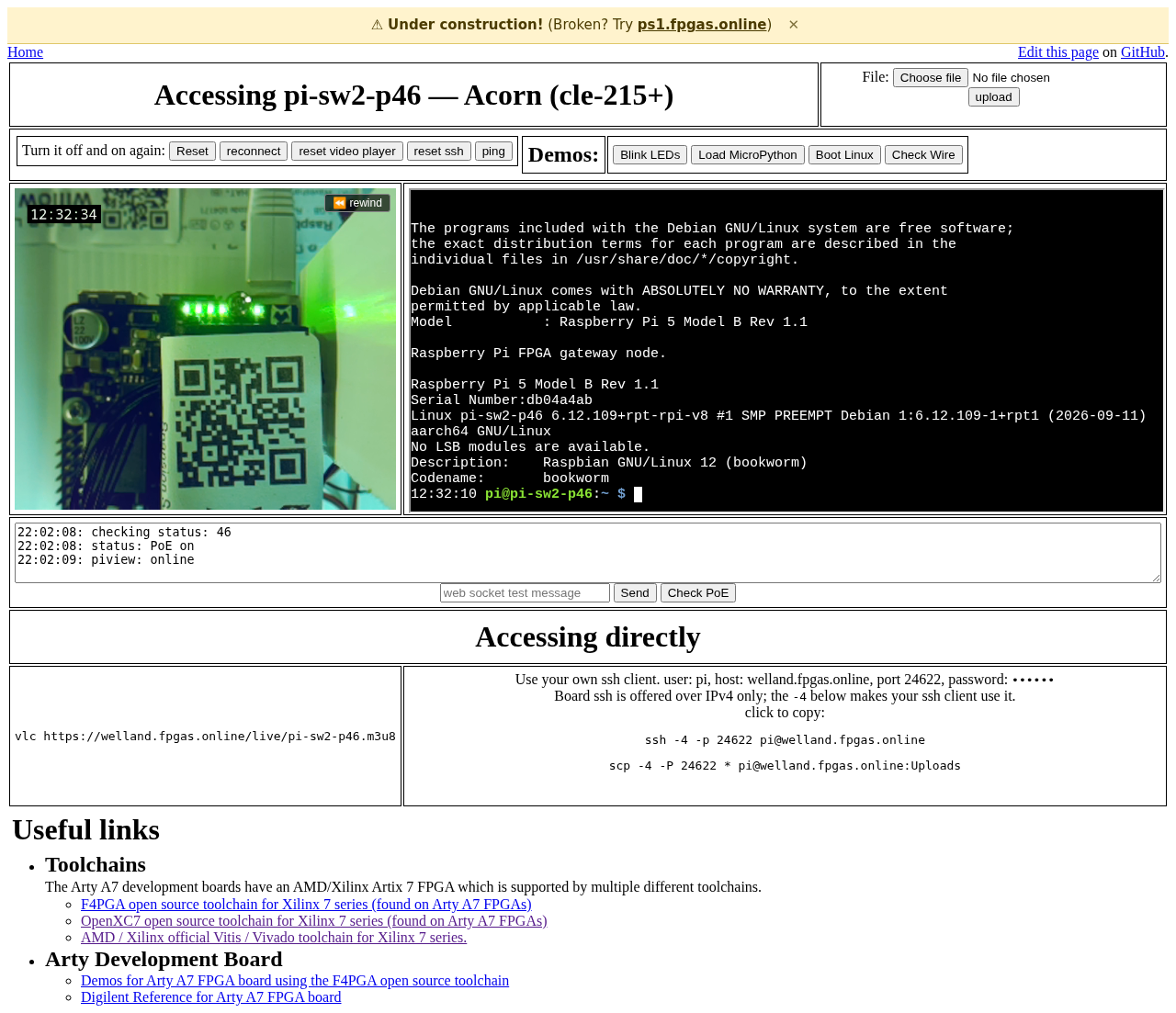
An Acorn’s page on welland, 11 Oct 2026. Each part is a row of the table below. The password in Accessing directly is hidden in this picture.
The parts of the page on welland
Part |
What it does |
What to know |
|---|---|---|
The list page |
|
A board is listed while its host has checked in lately and its check passed in this boot. |
Terminal |
A shell on the board’s host, logged in as |
Each login opens a window in a shared session, so another visitor may be typing too. |
reset ssh |
Connects the terminal again. |
The terminal also connects again by itself when the host’s ssh server comes up. |
Upload |
A file chooser and an “upload” button. The file goes into |
It does not load the file into the FPGA; a command in the terminal does that. A file of the same name is overwritten. A file can be up to 64 MB. |
Camera |
A live view of the board. |
The camera on a board says what it shows and how to watch it outside the page. |
Reset |
“Turn it off and on again: Reset” cuts the host’s power and restores it. |
How to reset a board. Everything written on the host is gone after it. |
Check PoE |
Writes the host’s power state in the status box, for example |
It also runs once when the page opens. |
ping |
Sends three pings to the host and writes each reply line in the status box. |
|
Status box |
Shows the power state, the host’s boot messages, the ping replies and the page’s connection to the site. |
The text field and “Send” post a test message to everyone on this board’s page. |
reconnect, reset video player |
Connect the status box again; reload the slower camera stream. |
|
Accessing directly |
The |
|
Demos |
Four buttons that type commands into the terminal. They run scripts from |
The scripts are written for the Arty A7 (site issue #104). |
Useful links |
Links at the bottom of the page. |
They are for the Arty A7 (site issue #105). |
Whatever you write on a host, uploads included, is gone after its next reset.
Where ps1’s page differs
ps1.fpgas.online runs an older version of the page.
Part |
On ps1 |
|---|---|
The list page |
Lists hosts by name, with no board type. |
Camera |
No low-latency view, only the slower stream, and no box saying when there is no picture. |
Check PoE, Reset |
Their answer goes to the browser’s console, not to the status box. |
Status box |
Does not connect again by itself; use “reconnect”. |
Accessing directly |
The |