Bootloader EEPROM on a Compute Module in a Compute Blade: does it need anything?
You have a Compute Module 4 or 5 in a Compute Blade (at ps1, each Acorn sits on one) and want to know whether its bootloader needs anything before or after the rest of the work. For the two Compute Module 5 Lite blades we read (pi16 at ps1 and pi20 at ps1), the answer is no; for the two Compute Module 4 blades at ps1 it is not known (below). A Raspberry Pi 5 has its own page; nothing there is for a blade.
Warning
There are no upgrade steps for a Compute Module in a Compute Blade, because we have not done one. What this page gives you is how to tell whether your blade needs anything. Both Compute Module 5 Lite blades we read (pi16 at ps1 and pi20 at ps1) are fine as they are and need nothing.
Does this blade need anything?
Log in to the blade the way you normally do and run these two. They change nothing and need no root.
At ps1, do not run them on the two Compute Module 4 blades (pi14 at ps1 and pi18 at ps1). There, on
7 October 2026, vcgencmd get_config enable_uart hung in the firmware and did not return: it could not be
stopped, and timeout 10 in front of it did not help (it was still waiting 15 minutes later). A reboot is
expected to clear it; not tried. Why it hangs is not known. So for those two blades the answer to this
page’s question is not known, and so are their labels, which wait on the same read (Labels). On a Compute Module 5 blade run
them as written (they answered on both; timeout 10 in front does no harm, and whether it would help there
is not known).
$ timeout 10 vcgencmd bootloader_version
2025/12/08 19:29:54
version 2226a853bb9f5fd80392e3a4a89e457aeca88008 (release)
timestamp 1765222194
update-time 1774980226
capabilities 0x0000007f
$ timeout 10 vcgencmd bootloader_config
[all]
BOOT_UART=1
# Default BOOT_ORDER for provisioning
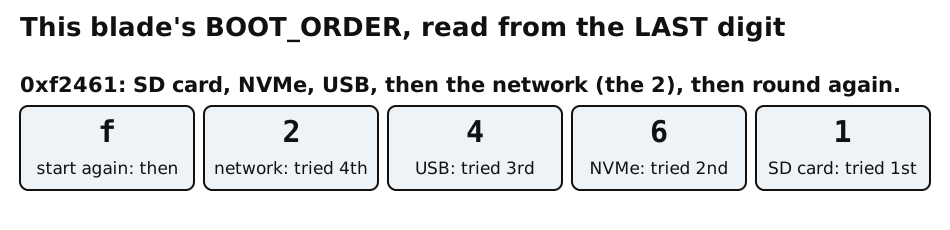
# SD -> NVMe -> USB -> Network
BOOT_ORDER=0xf2461
That is what one blade of ours (a Compute Module 5 Lite) printed while it was
running from the network. The Compute Module 4 blades at ps1 did not answer vcgencmd (above).

Important
What to do
Your blade starts from the network, and its
BOOT_ORDERhas a2in it (as0xf2461has;2is network boot in Raspberry Pi’sBOOT_ORDERtable): do nothing. Its bootloader is fine as it is.Your blade does not start from the network, or its
BOOT_ORDERhas no2in it: do not try to change it from this page. If the blade is part of fpgas.online, open an issue at fpgas-online/fpgas.online-docs with the two outputs above. If it is your own, this page cannot help you further: what the blade’s maker and Raspberry Pi document is quoted, untested by us, under What the Compute Blade’s maker documents.Your blade is meant to start from its own storage (an SSD or a card) and does: it is not broken, and nothing on this page applies to it.
A date in the first line that is older or newer than the one above is not a
reason to act, and neither is “UPDATE AVAILABLE” from rpi-eeprom-update.
Why there are no upgrade steps
Raspberry Pi documents two ways to write a Compute Module’s bootloader (Compute Module EEPROM bootloader):
over USB from another computer with
rpiboot, withEEPROM_nWPnot pulled low. Raspberry Pi’s bootloader page says this “is also the only option available for CM4 and CM4S”. On a blade it needs parts that the blade’s maker says only the Dev model of the blade has;“self-update” mode, from USB mass storage or network boot, which overrides the Compute Module default of the
rpi-eeprom-updateservice being off. Raspberry Pi warns that it “does not update the bootloader atomically. If a power failure occurs during an EEPROM update, you could corrupt the EEPROM.”
Neither has been tried by us on a blade. That is why a blade that works is left alone.